YouTube Shorts Thumbnail Download: the Upright File Has Its Own Name
A Short is vertical, and the thumbnail you want is vertical too — but the file name almost every guide hands you is not. Across 12 Shorts measured on 12 October 2026, maxresdefault.jpg returned a 1280 × 720 landscape file in 12 of 12 cases. The 1080 × 1920 upright picture was filed under oar2.jpg — also 12 of 12. So the short answer to "how do I download a Short's thumbnail" is: ask for oar2.jpg, not maxresdefault.jpg. The landscape file is not broken and not a crop failure — its middle is the upright frame, and the outer thirds are soft, lower-detail filler. If you save only maxresdefault.jpg you get a wide picture with blurry sides and no way to tell it was a vertical video at all.
What each name actually hands back for a Short
Twelve public Shorts, twelve file names each, 192 requests, and every pixel size read out of the file's own JPEG header rather than from the address:
| File name | Found on (of 12 Shorts) | Pixel size returned | Shape |
|---|---|---|---|
oar2.jpg | 12 of 12 | 1080 × 1920 | upright 9:16 |
oar1.jpg | 12 of 12 | 1080 × 1920 | upright 9:16 |
oar3.jpg | 12 of 12 | 1080 × 1920 | upright 9:16 |
oardefault.jpg | 10 of 12 | 1080 × 1920 on 6, 720 × 1280 on 4 | upright, two different sizes under one name |
sardefault.jpg | 2 of 12 | 1080 × 1920 | upright, but usually absent |
frame0.jpg | 12 of 12 | 268 × 480 on 9, 270 × 480 on 3 | upright 9:16, small |
maxresdefault.jpg | 12 of 12 | 1280 × 720 | landscape 16:9 |
hq720.jpg | 12 of 12 | 1280 × 720 | landscape 16:9 |
maxres2.jpg | 12 of 12 | 1280 × 720 | landscape 16:9 |
sddefault.jpg | 12 of 12 | 640 × 480 | landscape 4:3 |
hqdefault.jpg | 12 of 12 | 480 × 360 | landscape 4:3 |
mqdefault.jpg | 12 of 12 | 320 × 180 | landscape 16:9 |
default.jpg | 12 of 12 | 120 × 90 | landscape 4:3 |
Two names that sound like they belong to this family do not exist for Shorts: oar4.jpg and frame1.jpg returned 404 on 12 of 12. And the upright names are three different frames, not three sizes: oar2.jpg and oar3.jpg were never the same bytes in 6 of 6 Shorts tested — same 1080 × 1920 shape, different moment of the video.
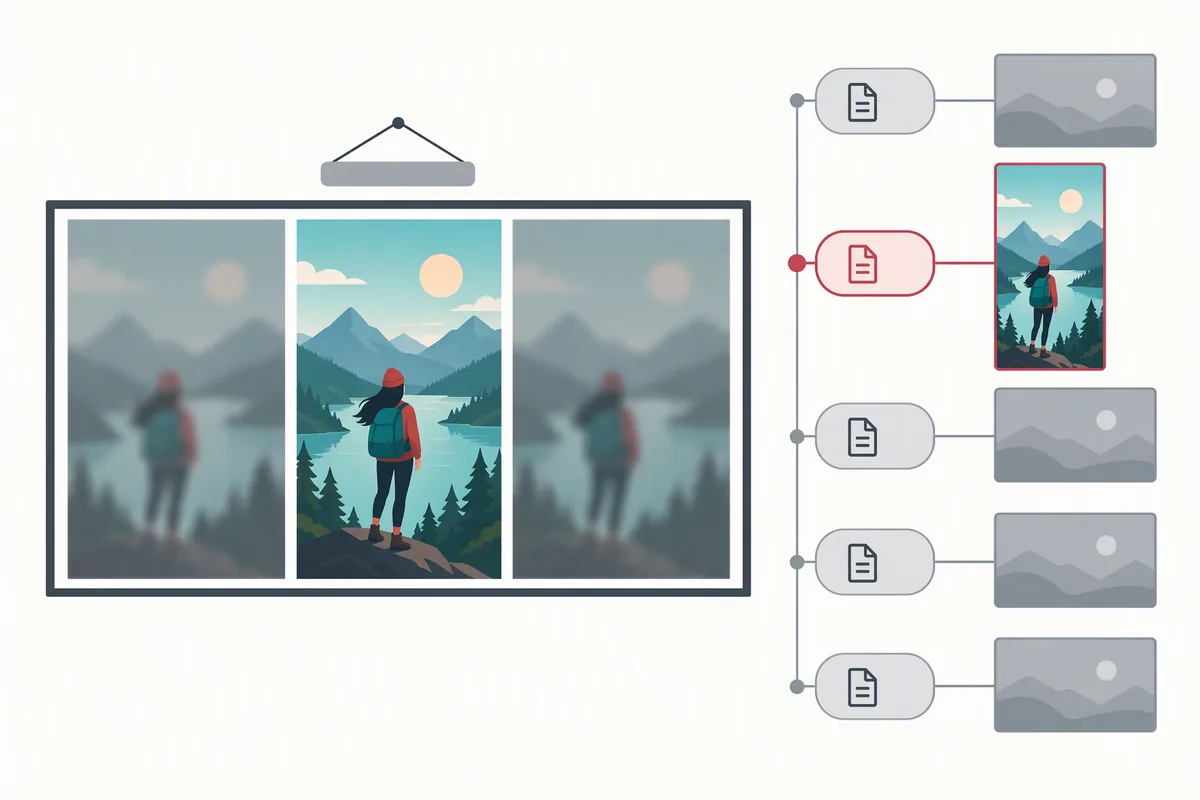
Why the landscape file looks wrong (and it is not a bug)
We compared the two files pixel by pixel on six of the Shorts. Taking the middle band of the 1280 × 720 file that corresponds to the upright frame, and the two outer bands that do not:
- The outer bands carry 70% to 93% less edge detail than the middle. Measured as edge energy, the bands scored 2.0–19.0 against 26.6–64.5 for the middle — the sides are smoothed-out fill, not detail.
- They are also darker. Mean brightness of an outer band ran 8.9–53.3 against 34.7–139.2 for the middle, on the same frame.
- The middle band is the real picture: in 4 of the 6, the middle of the landscape file matched the upright
oar2.jpgframe after resizing (mean pixel difference 1.6–5.2 out of 255). In the other 2 it was a different moment of the video.
So the landscape file is perfectly usable as a wide image — it just is not the shape of a Short. If you are collecting posters for a vertical feed, cards, or a comparison sheet, it is the wrong file, and nothing in the file tells you a vertical original exists behind it. The same trap runs the other way on ordinary videos: there, oar2.jpg means original aspect ratio, which for a 16:9 upload is landscape — 1920 × 1080 on one video and 1280 × 720 on another. oar does not mean "vertical"; it means "whatever shape this video was uploaded in".
The page's own HTML asks for two names — and it is not hq720
This is the part you can check yourself. Each Short's own page was fetched and searched for the file names it references:
| Name referenced in the page HTML | Shorts pages (of 7) |
|---|---|
frame0.jpg | 7 of 7 |
oardefault.jpg | 4 of 7 |
maxresdefault.jpg | 4 of 7 |
hqdefault.jpg | 4 of 7 |
oar2.jpg | 3 of 7 |
sardefault.jpg | 1 of 7 |
hq720.jpg | 0 of 7 |
hq720.jpg — a favourite of downloader tools — did not appear once on any of the seven Shorts pages. What appeared on all seven was frame0.jpg, the 268 × 480 upright crop, which is the shape a Short is actually displayed in. Its byte size is telling: on these twelve it ran from 1,049 bytes to 31,749 bytes, and on one Short the file was a hair over one kilobyte for a 270 × 480 image. A picture that compresses to 1 KB is a nearly flat one — frame0.jpg behaves like an untouched frame off the front of the video, not a designed poster. Useful for matching the feed exactly; useless if you want a picture worth looking at.
Which one to save, and what to expect while saving
- Want the upright poster? Ask for
oar2.jpg. 12 of 12 here, always 1080 × 1920, and in 10 of 12 it was the larger download than the landscape file — 75,412 to 383,626 bytes. - Want the feed's exact crop? Ask for
frame0.jpg. Present 12 of 12, but only 268 × 480 and sometimes almost blank. - Do not rely on
oardefault.jpg. It is missing on 2 of 12 and returned two different sizes with the same name — 1080 × 1920 on six Shorts and 720 × 1280 on four. - Do not reach for
hq720.jpgon a Short. It was byte-identical tomaxresdefault.jpgin 12 of 12 — you save the same file twice under two names, and both are landscape. (On ordinary videos the two names are not always the same file, which is how this myth survives — see the two-names page.) - Saving is a plain copy. Requests to a real name came back with a matching
Content-Length,Accept-Ranges: bytes, and a two-part range request reassembled into a byte-identical file; an out-of-range request was refused with416andContent-Range: bytes */110493. Missing names came back as 404 with a 1,097-byte, 120 × 90 grey JPEG cached for 30 seconds instead of 7,200 — the same miss described on the verification page.
The /shorts/ link needs no special handling
Four link shapes were requested for the same Short — youtube.com/shorts/<id>, the same with ?feature=share, youtu.be/<id>?feature=share and m.youtube.com/shorts/<id>. All four returned the page, and all four carry the same 11-character ID in the same place. So the input side is unchanged from ordinary videos — the whole difference between a Short and a normal video is on the output side, in which file name you ask for. If you only ever paste the link and let a tool pick, you have no control over that; the input page covers pulling the ID out of a link, and the front page will show you every size this site can reach once it has the ID.
A smaller copy if you want one
Every upright name has a WebP twin on a different host. The same upright picture was 89,128 bytes as WebP against 143,672 bytes as JPEG (about 38% smaller), and for the landscape file it was 32,998 against 98,006 — about 66% smaller. Two cautions from the same run: the WebP is on i.ytimg.com under a vi_webp path, and asking the ordinary image host for a .webp answered 404 with a 1,097-byte JPEG body — an extension that lies, which is why the saver page says to trust the bytes over the name.
Questions people actually ask
"I saved the thumbnail from a Short and got a wide picture with blurry strips down each side — did the download go wrong?"
Nothing went wrong, you asked for the wrong shape. maxresdefault.jpg was 1280 × 720 on 12 of 12 Shorts, with the upright frame in the middle and smoothed, darker fill on both sides — the outer bands measured 70% to 93% less edge detail than the middle. Ask for oar2.jpg instead and you get the 1080 × 1920 picture.
"Where is the tall picture I see in the Shorts feed?"
Two places, and they are different files. oar1.jpg, oar2.jpg and oar3.jpg are all 1080 × 1920 and all present on 12 of 12; frame0.jpg is the near-identical crop at 268 × 480, and it was the one name referenced by every Shorts page checked. Use oar2 for quality, frame0 for an exact match.
"My tool only offers maxres and hq — is that as good as it gets?"
For a Short, no. hq720.jpg was byte-identical to maxresdefault.jpg in 12 of 12, so the two options are literally one file, and both are the landscape version. The upright 1080 × 1920 file is only a name away but no Shorts page advertises hq720 at all.
"oardefault.jpg gave me 1080 wide on one Short and 720 wide on another — which is right?"
Both are, and that is the problem with the name. It exists on 10 of 12 Shorts and came back 1080 × 1920 on six and 720 × 1280 on four. Treat it as a fallback, not a first choice, and check the actual pixel size after saving rather than trusting the label.
"Is my link wrong because it says /shorts/ instead of watch?"
No. All four link shapes tested — including the mobile host and the feature=share variant — carried the same 11-character ID in the same position. The ID is the whole input; the file name you ask for afterwards is the whole decision.
Every number on this page was measured on 12 October 2026. The backbone is 12 public Shorts plus 4 ordinary videos × 12 file names = 192 requests to img.youtube.com/vi/<id>/<name>; the Shorts were taken from the /shorts tabs of two large public channels, and are identified by ID only. Added to that: a second pass of 118 requests (16 further file names on 6 Shorts, 4 link shapes, HEAD, a two-part range resume, an out-of-range range, and oar2 vs oar3 byte comparison on 6), 10 page fetches to read which names each page's own HTML references, and 48 requests for oar1, oardefault, sardefault, oar4 and frame1 across all 12. Pixel sizes were read from each file's own JPEG header; the shape analysis compared the middle band of the landscape file against its two outer bands on 6 Shorts. No title, channel name or watch link appears on this page, and no image is hosted here. Counts are given with their sample size because another set of Shorts would move them.