YouTube Embed Thumbnail: The 480 × 360 File, 20 Videos Out of 20
When a YouTube link is embedded on a page, or turned into a link card, the picture that appears is hqdefault.jpg at 480 × 360. We asked the oEmbed endpoint about 20 videos on 20 October 2026 — every single answer was that one file name, at that one size, with no query string, and its bytes were identical to /vi/<videoID>/hqdefault.jpg. All twenty had a much larger file sitting right there on the same host: the biggest available copy was 3.1× to 8.3× the bytes of the one the embed hands out. The player’s documented parameter list has 20 entries and no poster parameter, so there is no supported way to point the embed at a different picture. Below: the twenty rows, the size the player declares versus the size it serves, the 1,097-byte placeholder that looks like a picture, and the one thing that does put your own image in that slot.
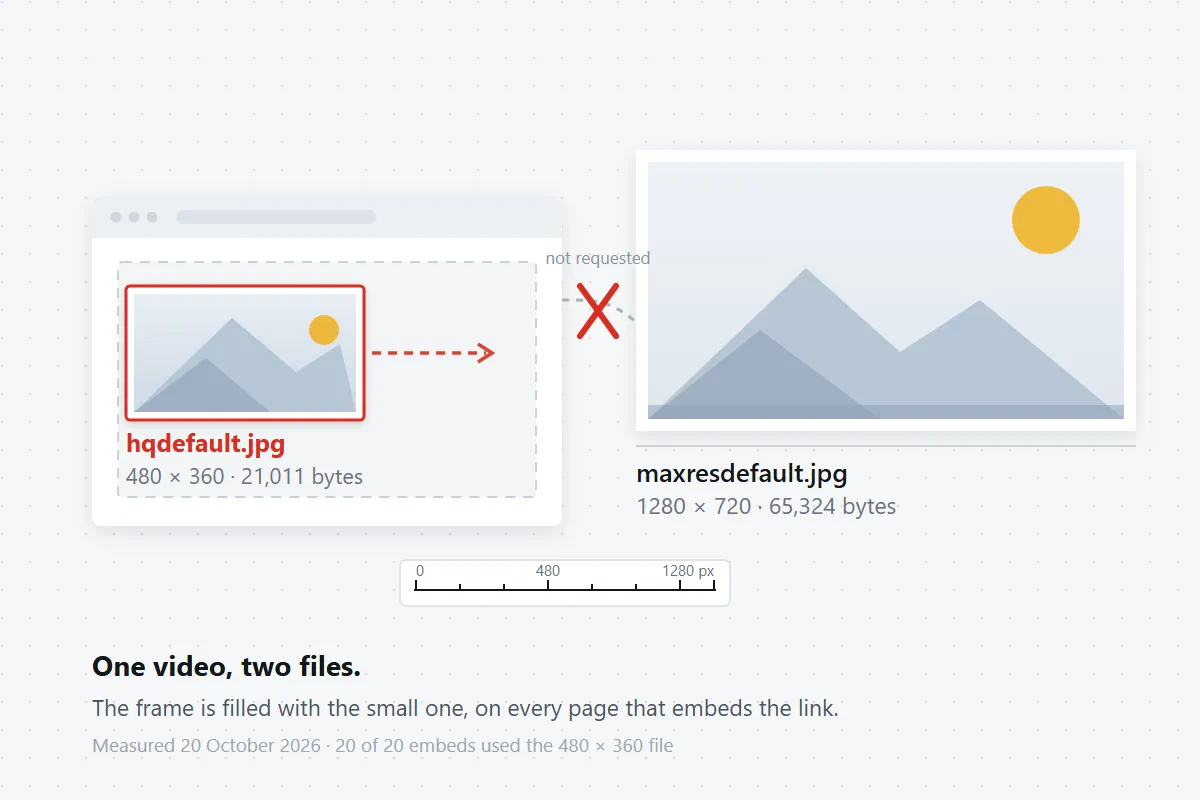
What the embed actually asks for
The clean way to see this is the endpoint any embedding system calls to build a card: youtube.com/oembed?url=<watch URL>&format=json. It returns a thumbnail_url, and that URL is the picture you see before anyone presses play. We ran it against 19 videos from one channel plus one long-lived public video, then fetched each returned URL and compared the bytes with the files on the still ladder. The result did not vary once.
| What was measured | Result | How |
|---|---|---|
file name in thumbnail_url | hqdefault.jpg, 20 / 20 | read from the JSON, not guessed from the page |
| declared size in the JSON | 480 × 360, 20 / 20 | thumbnail_width / thumbnail_height |
| query string on that URL | none, 20 / 20 | no sqp, no rs, no signature at all |
bytes of the returned file vs /vi/hqdefault.jpg | identical, 20 / 20 | same byte count and same SHA-1 per video |
| largest file available for the same video | 3.11× – 8.29× the card’s bytes | took the biggest of maxresdefault, hq720, hqdefault |
| embeds that offered a 1280 × 720 copy in the card | 0 / 20 | no card row named anything but hqdefault.jpg |
Twenty rows is not a huge sample, but the pattern has no exceptions in it, and the mechanism explains why: a card has to render on someone else’s page, at whatever width that page gives it, so it takes the size that is guaranteed to exist. hqdefault.jpg is the one file every public video has. We have measured the absence of the big files repeatedly — on 5 October 2026 only 10 of 12 sampled videos had maxresdefault — so a card built on the big file would sometimes have nothing to show.
Three videos, in full
These are the raw numbers for three of the twenty, kept as they came back, because the ratio is the part that matters when you are deciding whether to bother fetching the large file at all.
| Video | Card file (what the embed shows) | Largest file on the ladder | Ratio |
|---|---|---|---|
| I620WRWN0z4 | hqdefault.jpg · 11,013 B · 480 × 360 | 80,870 B · 1280 × 720 | 7.34× |
| 75mKLG1qEC8 | hqdefault.jpg · 3,896 B · 480 × 360 | 29,352 B · 1280 × 720 | 7.53× |
| dQw4w9WgXcQ | hqdefault.jpg · 21,011 B · 480 × 360 | 65,324 B · 1280 × 720 | 3.11× |
The same day’s ladder, measured with a plain request to i.ytimg.com/vi/<id>/<name>, put maxresdefault.jpg and hq720.jpg at 1280 × 720 for three of the five videos we laddered, and at 404 for the other two — so “just use the big one” is not a rule you can apply blind either. Which file exists is a property of the upload, and the missing-file page has the existence table.
What the player says it is showing, and what it serves
There is a second place the size is stated: the player’s own configuration. We read it through the player endpoint for one video and got five entries — four pointing at hqdefault.jpg with declared widths of 168, 196, 246 and 336, each carrying sqp and rs parameters, and one entry declaring 1920 × 1080 that pointed at the WebP copy, /vi_webp/<id>/maxresdefault.webp, 28,620 bytes.
Two things fall out of that, and both are the kind of thing you only notice by measuring:
- The declared size is not the pixel size. The entry that declared 336 × 189 returned a file that decoded as 480 × 360. The numbers in the list describe the slot the player intends to fill, not the file it fetched.
- The 1080p entry is the WebP, not the JPEG. Asking for that URL returned 28,620 bytes of WebP; the JPEG of the same picture is 65,324 bytes. Strip the query string anyway and the
hqdefaultentries still returned 200 with the same bytes — the signature on a still is decorative, which is what the address page shows part by part.
A limitation stated plainly: we could read that player configuration for one video only. From this machine the endpoint answered LOGIN_REQUIRED for the other five, and loading an embed in a real browser produced a player that refused to start — “Video player configuration error · Error 153” — so nothing above is a claim about how the player behaves after load, and we did not test whether start= changes the still.
Why a parameter cannot swap the picture
The embed page we fetched is 146 KB of HTML and contains no image address for the video at all — the only i.ytimg.com string in it is a preconnect hint. That is why “just add a parameter” fails to be even testable from the HTML: the picture is requested by the player script after the page loads, not written into the markup.
The documented list is the other half of the answer. We read the official player-parameters page on 20 October 2026: it documents 20 parameters — autoplay, cc_lang_pref, cc_load_policy, color, controls, disablekb, enablejsapi, end, fs, hl, iv_load_policy, list, loop, modestbranding, origin, playlist, playsinline, rel, start, widget_referrer — and the word poster does not appear anywhere on that page. There is no thumbnail override, no poster URL, no image parameter. If a site tells you to add &poster= to an embed and watch the cover change, it is describing something else.
The one thing that does put your image in that slot
If the goal is “my embed should show my picture, not YouTube’s 480 × 360 copy”, the working pattern is a facade: show your own image, and only build the iframe when someone clicks. Nothing is loaded from YouTube until then, so the picture in the frame is yours, at whatever resolution you have.
<div class="yt-facade">
  <a href="https://www.youtube.com/watch?v=VIDEO_ID" class="yt-facade-link">
    <img src="/your-poster.jpg" width="1280" height="720" alt="Your description">
  </a>
</div>

<script>
document.querySelector('.yt-facade-link').addEventListener('click', function (e) {
  e.preventDefault();
  var id = new URL(this.href).searchParams.get('v');
  var frame = document.createElement('iframe');
  frame.src = 'https://www.youtube-nocookie.com/embed/' + id + '?autoplay=1';
  frame.width = '100%'; frame.height = '100%';
  frame.allow = 'autoplay; encrypted-media; picture-in-picture';
  frame.title = 'Video player';
  this.parentNode.replaceChild(frame, this);
});
</script>
Two practical notes on that snippet, both measurable rather than advisory. The image you supply must exist at the path you write, because there is no fallback: a missing src gives a broken-image glyph, not YouTube’s copy. And if you would rather use YouTube’s own picture at a bigger size than 480 × 360, use the still ladder directly — /vi/<videoID>/maxresdefault.jpg — and check the byte count first, because a miss returns 1,097 bytes of 120 × 90 grey JPEG with HTTP 404, which every browser renders happily as if it were a picture. The verification page lists the fingerprints that separate a real file from that placeholder.
Which surface gives you which file
| Where the picture appears | File it uses | Measured on |
|---|---|---|
| link card / oEmbed embed | hqdefault.jpg · 480 × 360 · no query | 20 videos, 20 Oct 2026 |
| player configuration, largest entry | /vi_webp/<id>/maxresdefault.webp · 28,620 B | 1 video, 20 Oct 2026 |
| the still ladder you can fetch yourself | maxresdefault.jpg · 1280 × 720 · 65,324 B | 5 videos, 20 Oct 2026 |
| a name that does not exist | 404 · 1,097 B · 120 × 90 · grey | same five, two videos |
| hover preview on a card | signed animated WebP · 320 × 180 | 5 files, 19 Oct 2026 |
If what you actually came for is the picture at full size rather than the one in the embed, the viewer page walks the same ladder and shows which entry it stops at, and the downloader on the front page reads a video ID and returns the largest file that exists for it.
Questions people actually ask
“I embedded a video and the cover looks soft next to the rest of my page — is that my CSS?”
No. The card is a 480 × 360 JPEG, and it is being stretched to whatever width you gave the iframe. On the twenty videos we asked about, the card’s file was between 3,896 and 21,011 bytes, while the largest copy available for the same video was between 29,352 and 94,891 bytes. Nothing you can add to the embed URL changes that.
“Can I just put my own image as the YouTube embed thumbnail with a parameter?”
Not through the player. The official parameter page we read on 20 October 2026 documents 20 parameters and none of them concerns the poster image. The working approach is to render your own <img> and only create the iframe after a click, which is the snippet above.
“Why does the embed sometimes show a grey box instead of the video’s picture?”
Because a missing thumbnail name still returns a real image: HTTP 404 with a 1,097-byte, 120 × 90 grey JPEG. Browsers draw it without an error. If you saved that box believing it was the cover, the byte count is how you find out — a genuine 1280 × 720 file for the videos we laddered weighed 65,324 to 184,051 bytes.
“Is the picture in the embed the same as the one I get from a downloader?”
Usually not, and that is the whole point of the table above. The embed hands out hqdefault.jpg; a downloader that walks the ladder can return maxresdefault.jpg at 1280 × 720 when that file exists. Same picture, different file, roughly three to eight times the bytes.
“My video is a Short — does the embed show the upright frame?”
The card does not. One of the twenty samples was a Short, and its thumbnail_url was still hqdefault.jpg at 480 × 360, a landscape file. The upright 1080 × 1920 copies live under the oar names, which the Shorts page measured separately.
Every number on this page comes from requests we made on 20 October 2026: 20 oEmbed responses and the 20 files behind them, 5 still ladders across two hosts’ worth of names, the player configuration for 1 video, the embed HTML for 5 videos, and the official parameter page. Video IDs are shown as IDs; no video title, channel name, thumbnail image or link to anyone else’s video appears on this page. Three things we did not establish, and therefore do not claim: whether start= changes the still, whether the player’s post-load behaviour differs from the configuration it ships, and whether the twenty-of-twenty card result holds for categories of video we did not sample. Nothing here is estimated.